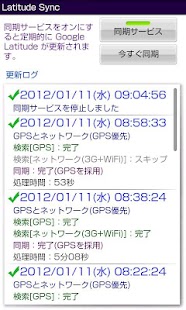
Latitude Sync
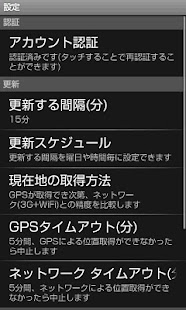
"Latitude Sync", in addition to the acquisition of location information by GPS, and the acquisition of location information through the network, and are here to better accuracy by comparing the two, to update the background at regular intervals specified It is possible.
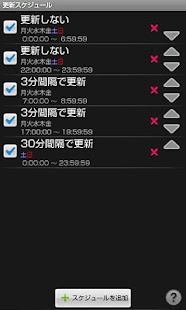
Schedule be carried out "until the day of the week What time do not update to conserve battery", "This time the opposite is frequently updated," "do not want the weekend update" and how you can be .
To schedule that was in my lifestyle, "Google Latitude" and make the most you can spend one's days in the battery-friendly.
"Latitude Sync" and "Mobile Google Map" is so independent, "Mobile Google Map" and "Latitude Sync" setting does not affect each other ("Mobile Google Map" set to not update the location information Even then, "Latitude Sync" location information is updated periodically to update if you put it in).
[If you have updated]
If you downloaded the new version from the market is always "Latitude Sync" Please start again.
Sister has stopped updating and synchronization service, "Latitude Sync" does not resume service until re-start.
Service will be resumed again Once launched, as is required especially if there is no "Latitude Sync" can be almost safely closed.
When you restart the terminal "Latitude Sync" There is no need to manually run.
If you exit the terminal you started with synchronization service, the service will automatically restart when you restart the terminal.
[If you are using the system task killer app]
If you are using a task-based killer apps, "Latitude Sync" Please set to be the target of a Tasukukiru ("Latitude Sync" or "net.snowwind.latitudesync" to kill a candidate to be excluded from Please have).
Has also been Tasukukiru service has been designed to automatically restart, the battery power becomes intense as Tasukukiru and restart frequently.
Also, when location updates in Tasukukiru, the update would have been forcibly broken.
About Latitude Sync
- Package name (App ID)
- net.snowwind.latitudesync
- Available on
- Google Play
- Price
- Free
- Version
- v1.20
Looking for the Latitude Sync APK?
The safest way to get Latitude Sync (net.snowwind.latitudesync) on your Android device is to install it directly from Google Play — you'll always get the latest official version, automatic updates, and no risk of modified or infected APK files from third-party sites.
Social Features
Connect and share with friends and the community.
Fitness Tracking
Track your workouts and monitor your health metrics.
Productivity Tools
Boost your productivity with powerful tools and features.
See Latitude Sync in Action
Frequently Asked Questions
Is Latitude Sync free?
Yes, Latitude Sync is free to download and install on Android through Google Play.
How do I install Latitude Sync on Android?
Open Google Play on your Android phone or tablet, search for Latitude Sync or tap the Google Play button on this page, then tap Install. The app downloads and installs automatically.
What is net.snowwind.latitudesync?
net.snowwind.latitudesync is the App ID (package name) of Latitude Sync on Google Play. Every Android app has a unique package name, and it is the safest way to verify you are installing the official app.
Is Latitude Sync safe to download?
Installing Latitude Sync from Google Play is the safest option: you get the official version, verified by Google Play Protect, with automatic updates. Avoid APK files from unofficial third-party sites.

Get Latitude Sync Today
Latitude Sync for Android — free download on Google Play.
Compatible with Android phones and tablets — available on Google Play.
Ask AI about this app
Get instant answers about features, tips and more from popular AI assistants.